

ServiceNow's Now Assist platform puts powerful GenAI capabilities directly in your hands. But with that power comes a question most developers face early on: when should I reach for AI, and when should I just write the flow? The wrong answer in either direction costs you either in over-engineered complexity or missed opportunities to automate the work that matters.
This post breaks down a practical decision framework, then walks through a real-world example: an AI incident knowledge creation subflow that uses Now Assist custom skills to automatically draft KB articles from incident data without a human ever opening the Knowledge module.
The Three-Tier Model: Flow, AI-Enhanced Flow, AI Agent
Before you build anything, it helps to think about ServiceNow's GenAI capabilities across three tiers. Each has a different level of AI involvement and fits a different class of problem.
Tier 1 – Regular Flow
A standard Flow Designer flow with no AI involvement. Steps are fully deterministic: inputs come in, logic branches based on conditions, actions fire, output is predictable every time. This is your workhorse for the bulk of ITSM automation.
Tier 2 – AI-Enhanced Flow (The Sweet Spot)
A regular flow that calls one or more Now Assist skills at specific steps using the Execute Skill action. The flow still owns the orchestration; the AI is a tool called at defined points, not a decision-maker. This is the tier most developers should be building in today.
Tier 3 – AI Agent / Agentic Workflow
A goal-based, reasoning-driven workflow where the AI decides what to do next at runtime. The agent can select tools dynamically, iterate, and respond to ambiguous inputs. Built in AI Agent Studio with conversational or non-conversational configurations.
When to Use Each: A Decision Framework
Use this table as a quick reference when deciding which tier fits your use case. The goal isn't to use the most sophisticated tool; it's to use the right one.
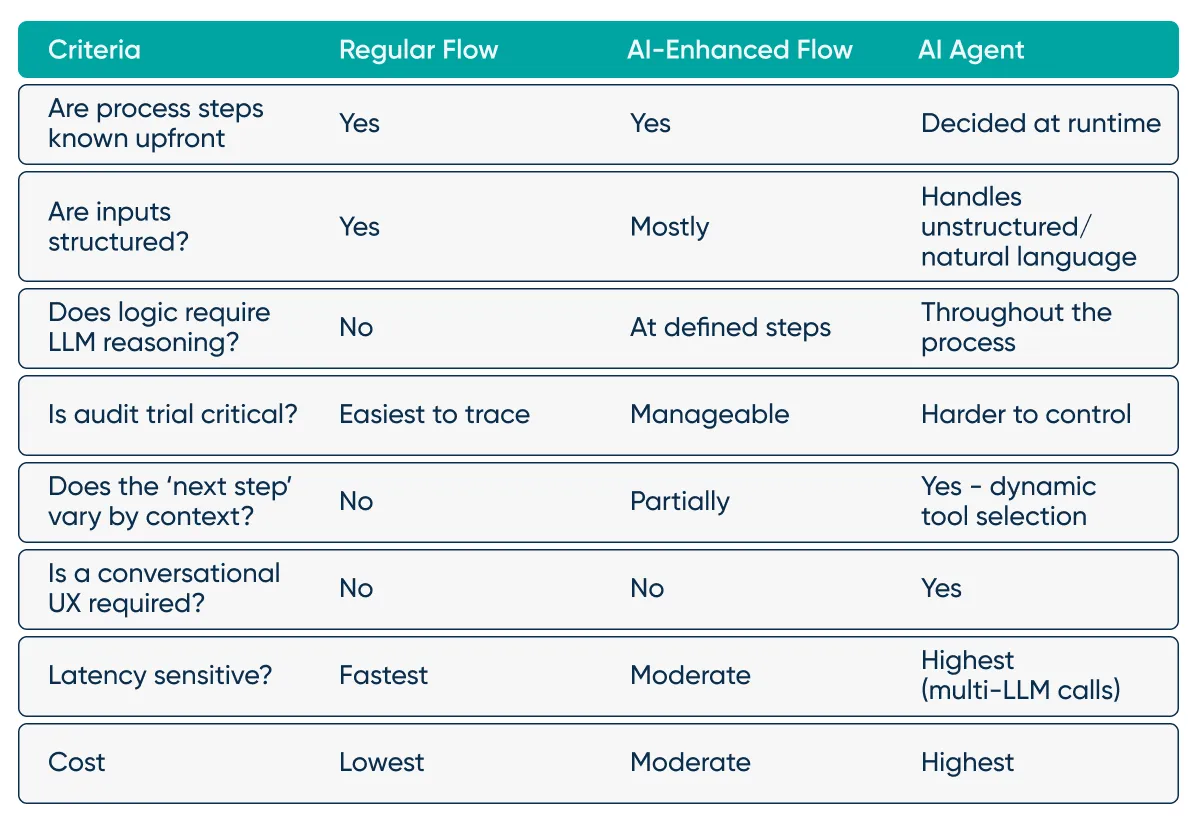
Bottom Line:
If you know the steps, use a flow. If you need LLM reasoning at specific points in a known process, embed skills in a flow. If you need reasoning to drive the process itself, build an agent.
Now Assist Skills in Flow Designer: The Execute Skill Action
The bridge between Tier 1 and Tier 2 is the Execute Skill action in Flow Designer. It calls a Now Assist skill and returns structured output you can map to flow variables.
A Few Things to Understand About Skills in Flows:
- Skills can be conversational (chat-based) or non-conversational (background processing). For flows, you almost always want non-conversational.
- Each skill call consumes “assists”, which is how ServiceNow tracks and bills Now Assist usage. Design your flows to gate skill calls; don't call a skill unless you've already validated the input is worth processing.
- Skills return output as structured data. Use a Set Flow Variables step after each Execute Skill to extract the fields you need.
- Custom skills built in the Skill Kit can accept structured inputs, call Script Includes, query tables, and return typed outputs – they're not limited to raw text generation.
- There are two separate places where you must enable “Flow action” usage of a skill for it to be available in the Execute Skill action.
- Now Assist Skill Kit > Home. Open your skill, go to the “Deployment and skill settings” tab, and check “Flow action”, then save.
- Now Assist Admin > Skills. Navigate to your skill, and flip the “Flow Action” switch.
How the Knowledge Creation Subflow Works
To make this concrete, let's walk through a subflow we built to automatically generate Knowledge Base articles from clusters of related incidents. It's a non-conversational subflow called from a parent flow after incident clustering completes, and it produces a first-draft KB article ready for review. The flow is structured around three phases: validate, evaluate, and generate.
Phase 1: Build Inputs and Trigger Subflow
Before the subflow can be triggered, we must build the inputs. In this flow, we are using clusters of incidents created by an AI-powered incident mining process. We identify clusters of similar incidents and then group them by configuration item, and do some manual deduplication targeting fully automated/identical incidents to reduce token usage. The primary input into the subflow is a JSON object representing a single configuration item, and all the relevant incidents along with their short description, description, work notes, and resolution notes.
{
  "cmdb_ci": "5607cb6c87e8895cac41eb183cbb35d2",
  "cmdb_ci_name": "Test_Job",
  "incidents": [
    {
      "incident": "INC1625214",
      "short_description": "PRD Job Test_Job | 12345678 | Completed Abnormally",
      "description": "Please see work notes for more information.",
      "work_notes": [ "The next run completed normally. so, closing the ticket" ],
      "resolution_notes": [ "The next run completed normally." ]
    },[...]
   ]
}
Phase 2: Validate and Prepare
Before any AI skill is called, the flow validates its inputs. There are a few thresholds defined for the minimum number of incidents required and minimum population percentage for work notes and resolution notes, preventing assists from being spent on a dataset that we can already tell doesn’t have much information for an LLM to work with. Then we optionally do some more cleanup, passing the incident set through our first custom Now Assist skill that identifies and removes near-duplicate incidents, keeping only semantically distinct examples from which an agent would learn something new about an issue. We want to help the LLM see the patterns without overloading it with data or using unnecessary tokens and assists, while still allowing it to identify patterns.
Phase 3: Evaluate Feasibility
Once the data is clean, another custom Now Assist skill evaluates whether the incident set actually contains enough resolution context to generate a useful KB article. If the evaluation score doesn't meet the threshold, the flow logs a warning and exits cleanly. This gate is one of the most important design decisions in the whole flow. Without it, you end up publishing thin, low-value articles that erode trust in the knowledge base. An evaluation call upfront saves you from expensive cleanup downstream.
Phase 4: Generate and Publish
Finally, if the data passes the feasibility check, a third Now Assist skill synthesizes the dataset into a structured KB article – defining the relevant CI, covering the issue pattern(s), root cause(s), and recommended resolution steps. The flow then extracts the generated content into discrete fields and creates the Knowledge record in ServiceNow. Articles are initially set to Draft state, giving teams the option to review before publishing, though the flow can be configured to publish automatically as confidence in the output grows.
Key Design Principles
These patterns from the subflow above apply broadly to any AI-enhanced flow you build.
- Gate AI Calls With a Data Completion Check
Not every trigger is worth acting on. Checking the inputs to your Now Assist skills before calling them is one of the most ROI-positive patterns you can implement. It's cheap, fast, and prevents wasted assists and noise. - Extract Before You Act
LLM output is text until you parse it. Always follow an Execute Skill step with a Set Flow Variables step that extracts specific fields. This decouples your downstream logic from the raw output format, and makes future prompt changes less likely to break your flow. - Keep Orchestration Deterministic
The flow controls what happens when. AI skills are workers, not managers. If you find yourself wanting the AI to decide which step comes next, you've probably crossed into agentic territory and should evaluate whether AI Agent Studio is the right tool. - Design for Observability
Log no-go decisions, feasibility scores, and skill outputs to a custom table or sys_flow_log. When something goes wrong, you need to know why the flow made the decisions it did.
Wrapping Up
Now you have an idea of what's possible when you treat GenAI as a specialized tool inside a well-orchestrated workflow. You're not handing the wheel to an LLM; you're using it to handle the cognitive steps that would otherwise require a human analyst reviewing incident notes and writing articles by hand. Not sure which tier fits your next use case? Talk to RapDev about your Now Assist strategy.