

We’ve all been there. You go to run a simple report, perhaps a breakdown of incidents by region or a map of your global assets, and the results look like a swiss cheese of "Empty" or "Unknown."
In ServiceNow, Location data (cmn_location) is a foundational pillar. It’s the connective tissue between your people (Users), your things (CIs), and your work (Incidents/Changes). When this data is broken, it doesn't just look bad on a slide; it actively cripples your technology operations.
3 Common ServiceNow Location Data Problems
Here are the most common problems with ServiceNow location data and how they sabotage your reporting.
1. "Orphan" Problem: Missing Parent Records
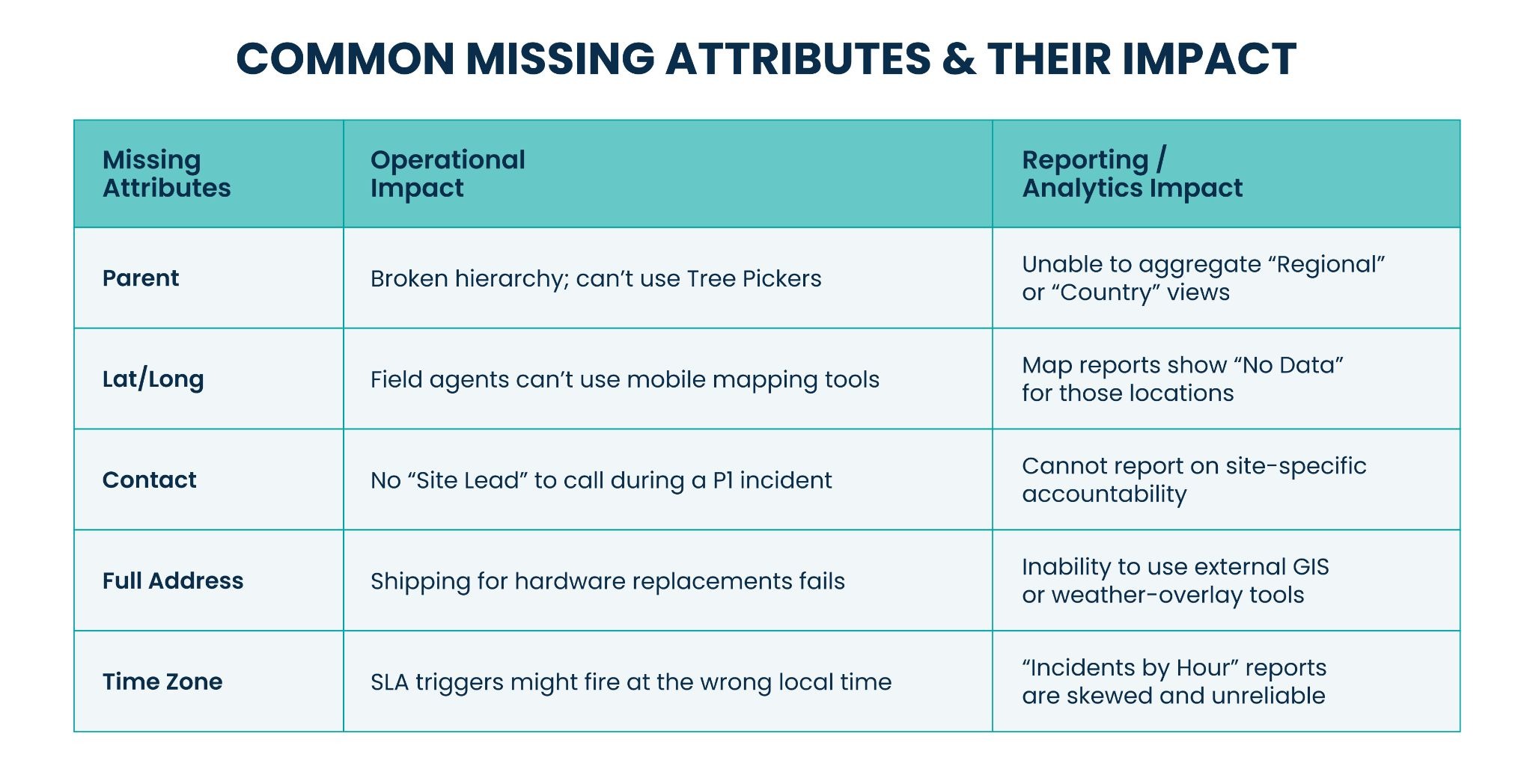
The most frequent issue in the cmn_location table is a lack of hierarchy. Locations are often imported as a flat list without a Parent value.
- The Impact: ServiceNow features like the Tree Picker become useless. If "New York Office" isn't parented to "New York" (State) and "USA" (Country), you cannot drill down or aggregate data.
- Reporting Fail: You can’t create a "North America" regional report because the system doesn't know which offices belong to that region. You're forced to manually group hundreds of individual sites.
2. Missing Latitude/Longitude
While ServiceNow can geocode addresses, many organizations rely on manual entry or legacy imports that omit Latitude and Longitude.
- The Impact: Modern ServiceNow dashboards utilize Map Report visualizations. Without coordinates, these CIs or incidents simply won't show up on the map.
- Reporting Fail: Your "Global Incident Heatmap" will only show 40% of your actual volume, leading leadership to believe certain regions are "quiet" when they might actually be in the middle of a blackout.
3. Missing or Inconsistent "Type" Attributes
The Location Type field (e.g., Campus, Building, Floor, Room) is often left blank.
- The Impact: You lose the ability to perform granular impact analysis. During a localized power outage, you can’t quickly query "all CIs on the 4th Floor of Building A."
- Reporting Fail: Capacity planning becomes a nightmare. You can't report on "Asset Density by Building" if the system can't distinguish between a 10-story headquarters and a small storage closet.
The Domino Effect on the CMDB
When location data is missing or "dirty," the Configuration Management Database (CMDB) loses its integrity. If a Server (cmdb_ci_server) is linked to an empty location record, you lose:
- Maintenance Windows: You can't automate updates based on local time zones.
- Compliance: You can't prove where data-sensitive hardware is physically located for audits (e.g., GDPR or HIPAA).
How to Fix It
- Enforce Mandatory Fields: At a minimum, make Name, Parent, and Country mandatory at the Data Policy level.
- Audit via Health Dashboards: Use the CMDB Health Dashboard to track "Completeness" and "Correctness" specifically for the Location table.
- Use Normalization Data Services: This plugin helps keep your Country and State names consistent (e.g., "USA" vs. "United States").
From Ghost Map to Source of Truth
Location data is the foundation of reliable ServiceNow reporting. When it's incomplete or inconsistent, the gaps spread into your CMDB, your dashboards, and your ability to respond when something goes wrong. Fixing your hierarchy, coordinates, and Location Types turns your ghost map into a source of truth your team can trust.
Ready to clean up your ServiceNow location data? Reach out to RapDev to learn how our ServiceNow experts can help you build a CMDB that works as hard as you do.